Blog
Keyboard Brushes: Single, Set or Upgraded?

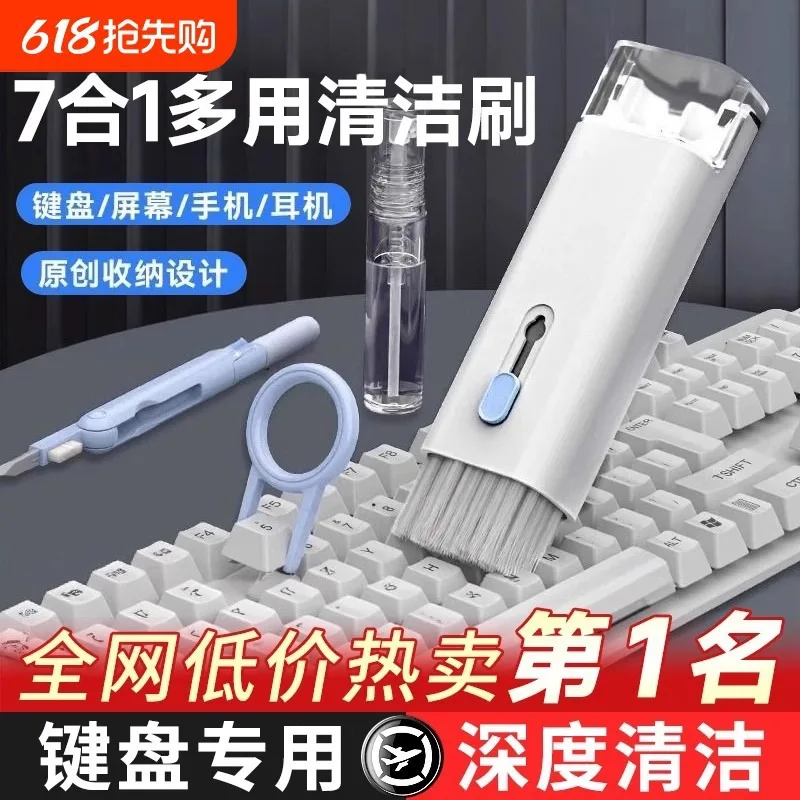
Keyboard brushes are cheap enough that the buying decision feels trivial, and it is not. A single brush and a set solve different problems, and an upgraded brush exists for a reason that a first-time buyer will not guess. Choosing the wrong form means either cleaning a keyboard with a tool that cannot reach the gaps, or paying for a set when one brush would have done.
Single brush against a set
A single brush suits one surface and one kind of debris. A set exists because a keyboard presents several surfaces at once: the flat tops of keycaps, the narrow gaps between them, the seam around the case, and the vents or grille that collect the most dust. No one brush covers all four well.
| Form | Covers | Best when |
|---|---|---|
| Single brush | One surface or one gap size | A single, repetitive cleaning task |
| Set | Several shapes for several surfaces | A whole keyboard, or several devices |
| Upgraded pair | Two better brushes instead of many plain ones | Regular work where quality matters more than count |
The practical pattern is that a set is cheaper per brush, while a smaller number of better brushes does the delicate work more safely. A keyboard cleaned weekly does not need twelve pieces; it needs two that hold their shape.
What the upgrade actually buys
Upgraded brushes differ in three ways: denser bristle packing, a firmer and more precisely shaped tip, and a handle that will not flex under pressure. The effect of all three is control. A denser brush holds dust instead of pushing it around, a firmer tip reaches into a gap without splaying, and a stiff handle lets the user apply light pressure accurately rather than pressing harder to compensate for flex.
| Feature | Plain brush | Upgraded brush |
|---|---|---|
| Bristle packing | Looser, dust slips past | Denser, holds what it collects |
| Tip shape | Rounded, cannot enter gaps | Finer, reaches between keys |
| Handle stiffness | Flexes under pressure | Rigid, gives accurate control |
| Bristle life | Splays quickly | Holds shape much longer |
For occasional use the difference is small. For a bench that cleans several devices a week, it is the difference between a brush that lasts a month and one that lasts a year.
Matching the brush to the device
A desktop keyboard with deep keycaps is approached differently from a laptop with a low-travel keyboard and a sealed case. The desktop has real gaps that collect crumbs and can be reached with a pointed brush. The laptop has almost no gap, a fragile surface, and vents that hold dust; it needs a soft flat brush and a small amount of care around the vents rather than a pointed tool pushed into seams.
Equipment panels, instruments and grilles fall somewhere between the two. Where the surface is unknown, the safest approach is the softest brush first, and the pointed brush only where debris is visible and the surrounding surface is robust.
Keyboard brush options in this range
Every option in this range
Options cover single brushes, full sets and an upgraded pair, in the standard pattern and a blue finish. Prices are per brush or set.
| Option | Form | Best for | Price |
|---|---|---|---|
| Standard option | Brush or small set | Occasional desk cleaning | $8.99 |
| Blue finish | Brush or small set | The same tool in a coloured finish | $8.99 |
| Set, standard pattern | Multi-piece set | Cleaning a full keyboard | $8.99 |
| Set, alternate pattern | Multi-piece set | A second set for another bench | $8.99 |
| Upgraded, two piece | Two better brushes | Regular cleaning where quality matters | $17.98 |
| Upgraded, two piece, spare | Two better brushes | A second upgraded pair | $17.98 |
| Upgraded pair, extra | Two better brushes | Repair bench or shared kit | $17.98 |
The upgraded pair costs about twice a standard set and contains far fewer pieces, which is the whole point: fewer brushes, each of them better suited to delicate work.
Keeping brushes effective
- Shake debris out after every use and store the brush bristle-up or in a case.
- Never store a brush compressed under other tools; the bristles take a permanent set.
- Wash plastic-handled brushes in warm water only when the bristles are greasy, then dry them fully.
- Replace a brush once the tip splays and no longer reaches the gaps.
- Keep one brush reserved for screens and delicate surfaces, used for nothing else.
- Retire any brush that sheds, because loose bristles inside a keyboard cause faults.
A cleaning routine that protects the device
Dust comes off the surface first, working with the brush rather than against it. Gaps come next, brushed at a shallow angle so the debris is lifted toward the edge instead of pushed deeper. Vents and grilles come last, and that is the only stage where a firmer tool is justified. Anything remaining after that belongs to a vacuum or a blower, not to a harder brush or more pressure.
Keeping to that order is what stops the most common form of accidental damage, which is reaching for the stiffest brush at the point of maximum frustration and marking a keycap that was perfectly good a moment earlier.
Brushes around vents and cooling
Vents are where a keyboard or instrument collects the most dust and where a brush can do the most damage. Pushing a brush into a vent drives debris deeper into the cooling path, where it settles on the fan and the heatsink. The correct approach is to hold the brush lightly at the vent surface and work outward, or to use the brush to disturb dust that a blower then lifts away. A brush used alone will move the dust around, not remove it.
Where the equipment has removable filters or a serviceable fan, cleaning those directly is more effective than any amount of brushing at the outside. A brush is a tool for surfaces, not a substitute for maintenance access.
Frequently Asked Questions
Is a single keyboard brush enough?
For a surface-only wipe, yes. For a full keyboard with gaps, vents and a case, a set of two or three shapes does the job properly.
What does an upgraded keyboard brush change?
Denser bristles, a finer tip and a stiffer handle. All three improve control, which is what protects delicate surfaces.
Can I wash a keyboard brush?
Plastic-handled synthetic brushes can be washed in warm water and dried fully. Natural bristles hold oil and are harder to clean.
How often should brushes be replaced?
When the tip splays or the bristles no longer hold dust. In regular bench use that is usually a matter of months.
Will a brush remove sticky residue?
No. A brush moves dry debris. Sticky residue needs a suitable cleaner and a cloth, kept away from switches and boards.
Choosing the right brush
Decide how often the work is done and how delicate the surfaces are, then choose between a set for coverage and an upgraded pair for control. The keyboard brush range covers standard sets and an upgraded pair, so the tool can be matched to the cleaning rather than to the price.